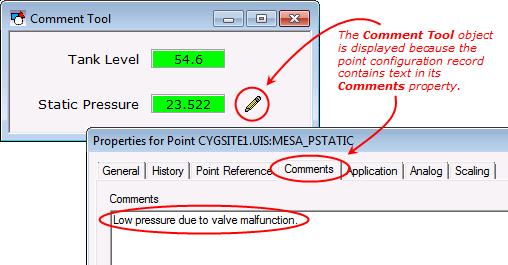
 The Comment Tool is basically a conditional Image Tool. A bitmap image is displayed only when the object’s point has text in the Comments property in its point configuration record.
The Comment Tool is basically a conditional Image Tool. A bitmap image is displayed only when the object’s point has text in the Comments property in its point configuration record.
To associate the object with a point use the point identifier properties to form a fully qualified CygNet tag string. The point identifier properties are [1:SiteService], [2:Point ID], [3:Long Point ID], [4:Facility ID], and [5:UDC]. If the object is on a templated screen, only use the [5:UDC] property.
The [Image] property defines the image displayed by the object.
The Layout property specifies the image’s relationship to its boundary. If set to Left, Right, or Center, the image is set to its original size and proportions and is aligned within the boundary in the top left corner (Left), the center (Center), or the bottom right corner (Right). If set to Size to Fit, the boundary is resized to fit the image’s original size and proportions. If set to Stretch, the image is sized to fit within the object’s boundary (proportions are not maintained) and can be resized by dragging the object’s boundary. To maintain the current proportions while resizing, hold down the Shift key. To resize the image one pixel at a time regardless of TheView’s grid settings, hold down the Shift key and use the cursor keys.
If you want the image to be resized when the screen is resized in Run mode, its Layout property must be set to Size to Fit and FlexHorizontal and FlexVertical must be set to Expand or Proportional.
More:
 Comment Tool - Selecting an Image
Comment Tool - Properties, Events, and Methods
|
|
|

